Using pins for Shiny with ever-changing data
End-to-end workflow with Posit Team
2024-08-28
Today’s project
Today’s project is a Shiny app I built to streamline our marketing content calendar. I rely on Jira for managing deadlines, but its interface isn’t the easiest for quickly scanning dates across categories. So, I decided to create a Shiny app. With Shiny, I could create a responsive and user-friendly interface that makes it easier to track, filter, and visualize the schedule. And through the use of tools we’ll talk about today, I know that it’s always showing the most updated Jira data.
Workflow
To run this workflow, we start by retrieving the desired Jira API data. Using Posit Workbench, we create a document called data-pull.qmd to pull and clean the data. Next, we connect to our Posit Connect pin board and write the cleaned data to a pin. This process can be scheduled to run automatically. We then develop our Shiny app in app.R, also within Posit Workbench, and deploy it to Posit Connect. By using pin_read_reactive, the Shiny app will automatically update whenever it detects changes in the pin on Posit Connect.
Pulling data from an API
Pulling from an API can be done with requests in Python or {httr2} in R
```{python}
import requests
from requests.auth import HTTPBasicAuth
import json

username = "ivelasq@gmail.com"
api_key = r.api_key

social_url = "https://ivelasq.atlassian.net/rest/api/3/search?jql=project%20=%20KAN%20AND%20text%20~%20%22\%22social\%22%22"

social_results = get_response_from_url(social_url, username, api_key)
```
In R, we can then convert the results into a dataframe using {jsonlite}
```{r}
dat_json <-
 py$social_results |>
 jsonlite::fromJSON()

/* Clean final data here */
```
How can we keep the results up to date?
I used a Quarto document to pull data because it allows combining both Python and R chunks. However, this process could be handled with just a script. First, we write code to request data from the API, converting it into a usable format like a data frame. After that, we clean the raw data for analysis. [click] But given that Jira data constantly updates, the challenge is creating a cleaned dataset that’s easy to access and keeps up with changes. So how can we do this?
Enter pins
This is where tools like pins come in, enabling you to store and retrieve the processed data. The pins package publishes data, models, and other R or Python objects and pin objects to a variety of pin boards. In the data-pull.qmd file, we include the script to connect to our board (e.g., Posit Connect), clean the data, and then write the cleaned data into a pin. This pin is stored on our board and can be easily referenced in scripts or Shiny apps for data access and use.
Using pins
Create a file for connecting to a board and writing a pin:
```{r} board <- pins::board_connect( auth = "manual", server = Sys.getenv("CONNECT_SERVER"), key = Sys.getenv("CONNECT_API_KEY") ) ``` ```{r} pins::pin_write(board = board, x = pin_dat, name = "isabella.velasquez/pin_dat") ```
Read a pin:
<- :: pin_read (name = "isabella.velasquez/pin_dat" ,board = board)
This is where tools like pins come in, enabling you to store and retrieve the processed data. In the data-pull.qmd file, we include the script to connect to our board (e.g., Posit Connect), clean the data, and then write the cleaned data into a pin. This pin is stored on our board and can be easily referenced in scripts or Shiny apps for data access and use.
Updating pins
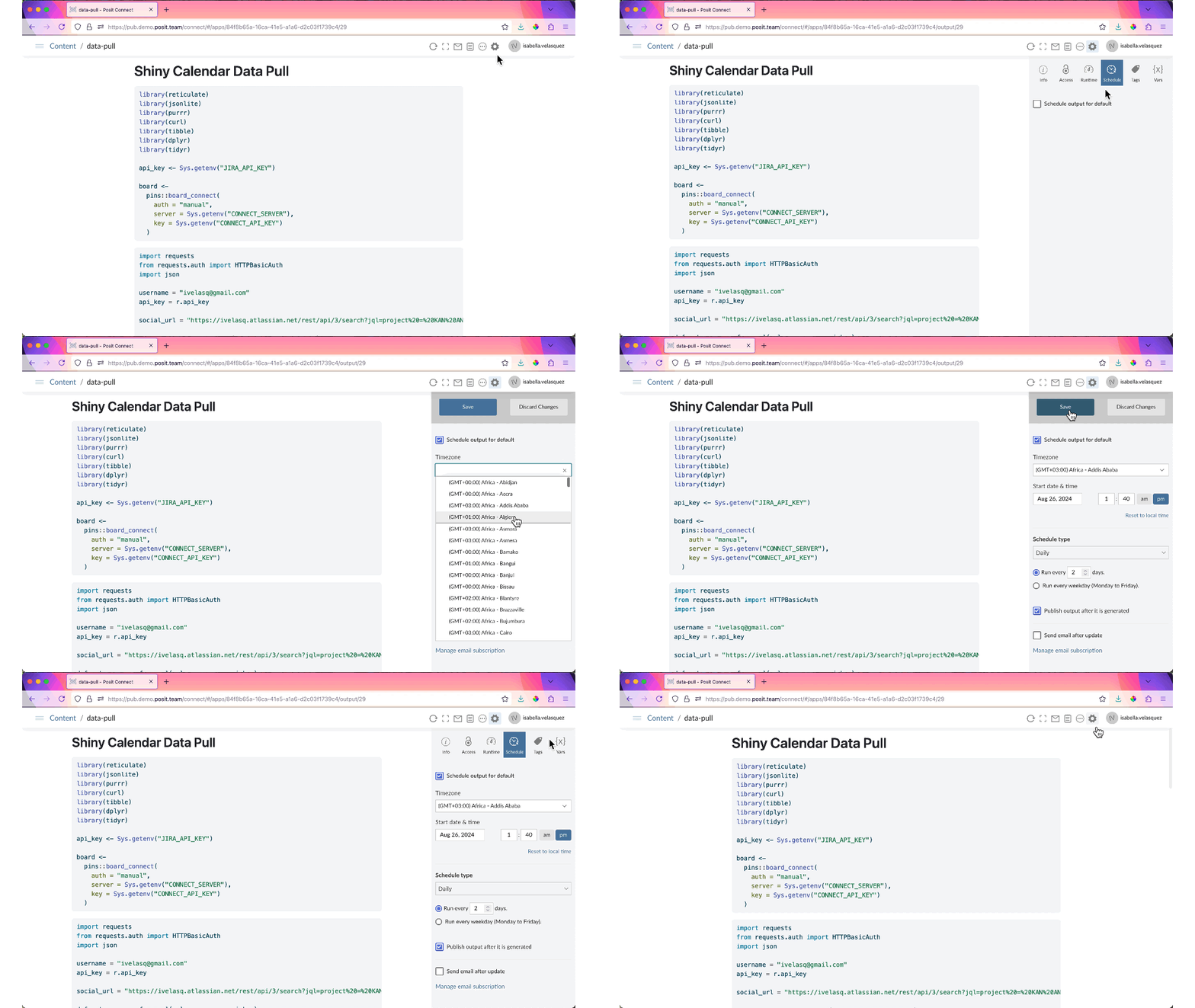
Schedule refreshes of pins on Posit Connect:
With Posit Connect, you can schedule automatic refreshes of your pin to ensure your data stays up-to-date. Posit Connect allows you to deploy Python & R frameworks. Publish Shiny, Dash, Streamlit, Quarto, R Markdown, Jupyter Notebooks, Flask, FastAPI, Plumber, Bokeh, and more.
Shiny
Shiny is a framework for creating web applications using R code.
Shiny is an R package for building interactive web apps that respond to user inputs and data changes in real time. It lets you turn your analyses into interactive applications.
Shiny and reactivity
Shiny uses the reactive programming model.
Allows the app to automatically update outputs whenever the underlying data or user inputs change
Reactive expressions automatically re-execute when their dependencies change
Trigger actions in response to changes in reactive values
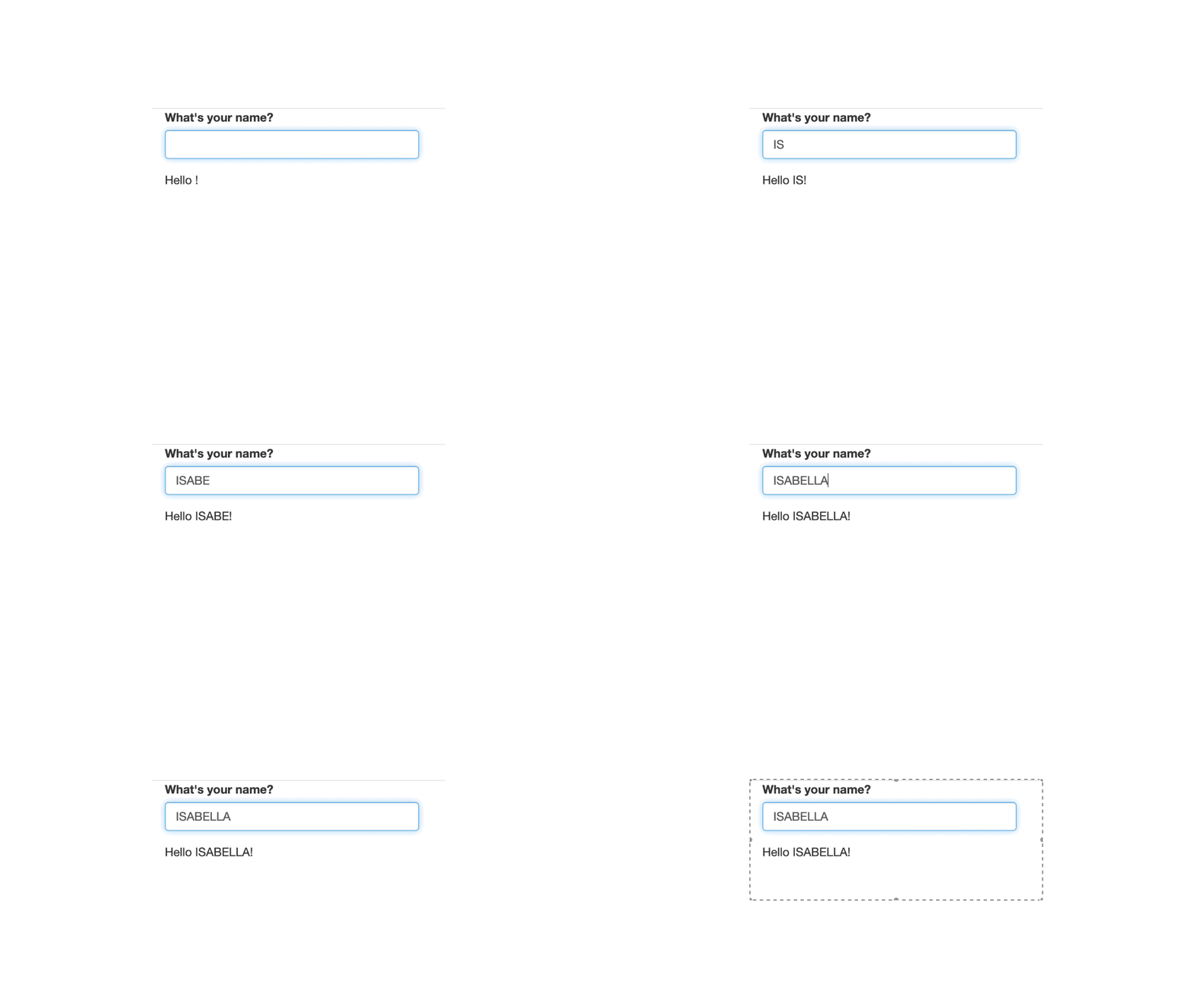
See how the greeting updates automatically as you type:
How can we do this with data?
Shiny’s power lies in its reactivity, where outputs instantly update whenever inputs or underlying data change. This allows your app to stay responsive and interactive without needing manual refreshes, making it perfect for real-time data exploration.
Enter pin_reactive_read()
pin_reactive_read() wraps the results of pin_read() into a Shiny reactive.
Use pinned data within your app
Have the results automatically recompute when the pin is modified
Use it like so:
pin_reactive_read (board, name, interval = 5000 )
Let’s see it in action!
Using pin_reactive_read() in your Shiny app enables real-time access to your pinned data. This function automatically updates your app whenever the pin is refreshed, ensuring that your app stays responsive and always uses the latest data available.